
Restricted PDF file
The situation is related to security measures detected by our system on .pdf files containing a watermark or similar file marking invisible to the naked eye, which depends on the way the file was created (e.g. by downloading it from another VDR or from a secured server). As a result, the VDR system has prevented the file from being uploaded, which is a standard security procedure at FORDATA.
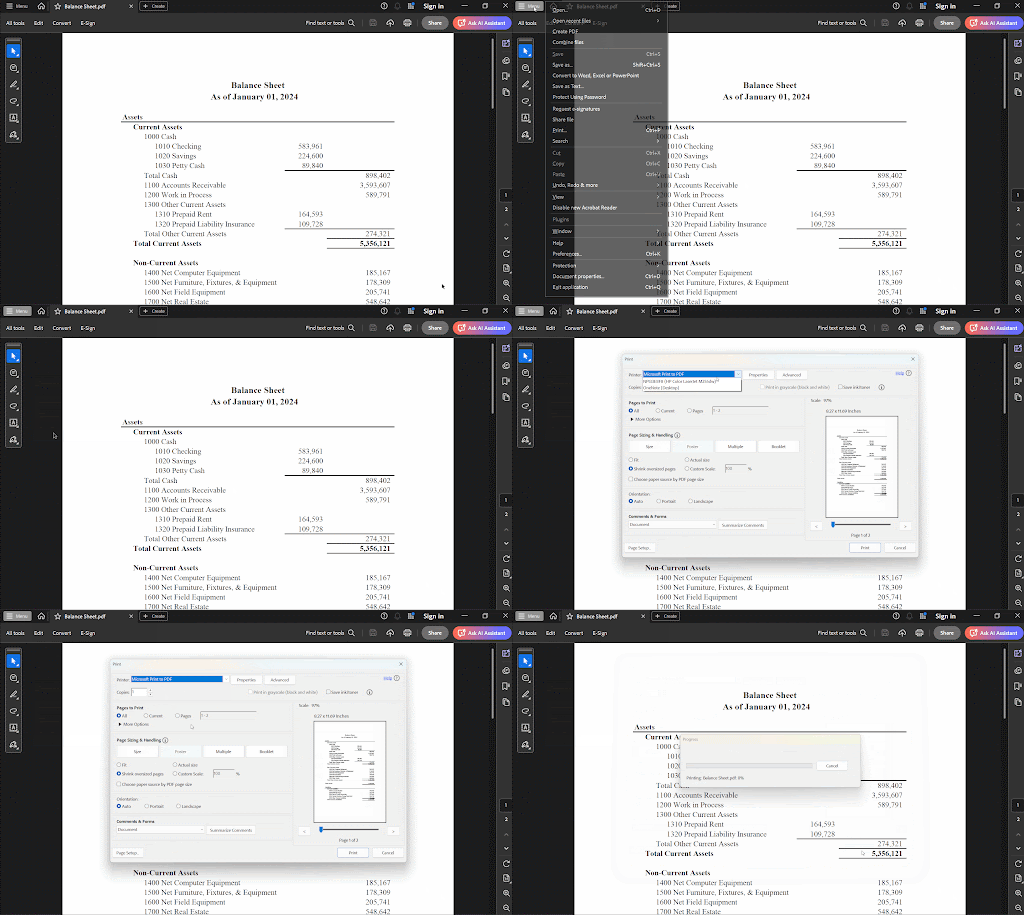
To successfully upload these .pdf files to the Data Room, they need to be reprinted using the Microsoft Print to PDF function in Adobe Acrobat, which will remove all types of file security protections.
Instructions for Windows:
- Open the PDF file on your computer in Adobe Acrobat.
- Open the Print dialog (press Ctrl + P).
- Select the Microsoft Print to PDF option from the available printers.
- Confirm that you want to "print" (i.e. reprint) the document.
Instructions for MacOS:
- Open the document you want to save as a PDF file.
- Select the menu command File > Print.
- Click the PDF button or the drop-down arrow to open the PDF pop-up menu, then select Save as PDF.
- The PDF pop-up menu, containing PDF-related commands, including Save as PDF.

The system will then ask you to specify the location where the file should be saved. Simply indicate a location on your computer and it will complete the task. Finally, try uploading the new (reprinted) document to the VDR.
Do you have any additional questions?
#FORDATAteam is here for you.
Contact us via email at support@fordatagroup.com
or call us at:
EMEA +44 204 584 3861
APAC +852 21 582 983
Americas +1 917 779 9339